|
大小: 321
备注:
|
大小: 2050
备注:
|
| 删除的内容标记成这样。 | 加入的内容标记成这样。 |
| 行号 1: | 行号 1: |
| 1. 空间坐标如何表示?空间坐标有哪些基本的变换?坐标变换有些什么性质? 1. 平面上的坐标变换有哪些?它们各有什么特性?不同的变换之间有什么联系? 1. 在对图形进行几何变形时,为什么需要对像素进行插值?有哪些插值的算法? |
== 空间几何变换 == 将(w,z)坐标系上的图像变换为(x,y)坐标系上的图像,可以表示为: * (x,y) = T{(w,z)} 比如: * (x,y) = T{(w,z)} = (w/2, z/2) {{attachment:figure51.png}} === 仿射变换 === 仿射变换是一种常用矩阵变换,它可以表示成矩阵的形式: {{{#!latex $[\begin{matrix}x & y & 1\end{matrix}] = [\begin{matrix}w & z & 1\end{matrix}]T = [\begin{matrix}w & z & 1\end{matrix}] \begin{pmatrix} t_{11} & t_{12} & 0 \\ t_{21} & t_{22} & 0 \\ t_{31} & t_{32} & 1 \\ \end{pmatrix}$ }}} {{attachment:figure52.png}} 在matlab里面实现 {{{ wz = [3 4 1]; T = [2 0 0; 0 3 0; 0 0 1]; xy = wz * T; wz = xy * inv(T); }}} 为了避免归一化参数,我们可以借助maketform函数: {{{ T = [2 0 0; 0 3 0; 0 0 1]; tform = maketform('affine', T); wz = [1 2; 3 4]; xy = tformfwd(wz, tform); wz = tforminv(xy, tform); }}} 我们可以用一个栅格图像来形象的表示这些变换的效果: {{attachment:figure53.png}} 这些变换使用的变换矩阵分别是: {{{#!latex $\begin{pmatrix} 2 & 0 & 0 \\ 0 & 3 & 0 \\ 0 & 0 & 1 \\ \end{pmatrix}$ }}} {{{#!latex $\begin{pmatrix} 1 & 0 & 0 \\ 0.2 & 1 & 0 \\ 0 & 0 & 1 \\ \end{pmatrix}$ }}} {{{#!latex $\begin{pmatrix} 1.5 & 0 & 0 \\ 0 & 2 & 0 \\ 0 & 0 & 1 \\ \end{pmatrix}* \begin{pmatrix} cos(\pi /4) & sin(\pi /4) & 0 \\ -sin(\pi /4) & cos(\pi /4) & 0 \\ 0 & 0 & 1 \\ \end{pmatrix}* \begin{pmatrix} 1 & 0 & 0 \\ 0.2 & 1 & 0 \\ 0 & 0 & 1 \\ \end{pmatrix}$ }}} === 对图像应用空间变换 === 在matlab中使用imtransform实现图像的空间变换。语法是{{{ g = imtransform(f, tform, interp); }}}其中,interp可以是'nearest','bilinear'或者'bicubic'。 比如: {{{ f = chekerboard(50); s = 0.8; theta = pi/6; T = [s*cos(theta) s*sin(theta) 0; -s*sin(theta) s*cos(theta) 0; 0 0 1]; tform = maketform('affine', T); g = imtransform(f, tform); }}} === 图像配准 === {{attachment:figure54.png}} |
空间几何变换
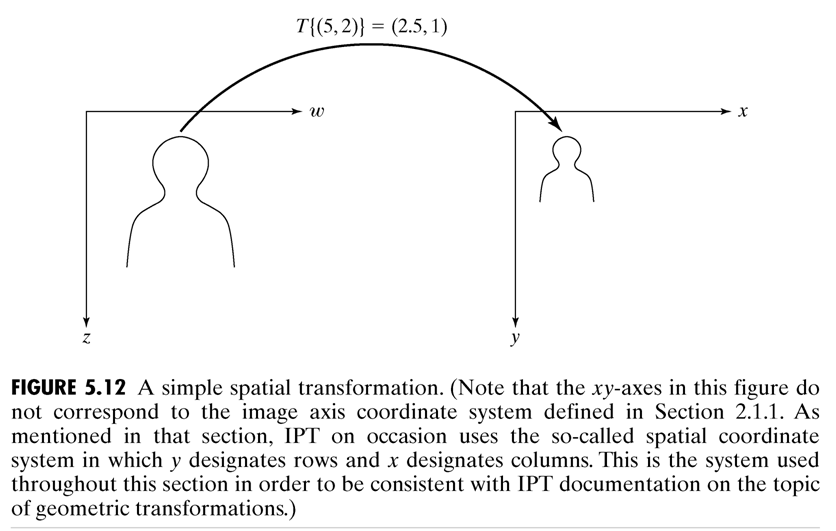
将(w,z)坐标系上的图像变换为(x,y)坐标系上的图像,可以表示为:
- (x,y) = T{(w,z)}
比如:
- (x,y) = T{(w,z)} = (w/2, z/2)
1. 仿射变换
仿射变换是一种常用矩阵变换,它可以表示成矩阵的形式:
![$[\begin{matrix}x & y & 1\end{matrix}] = [\begin{matrix}w & z & 1\end{matrix}]T = [\begin{matrix}w & z & 1\end{matrix}] \begin{pmatrix}
t_{11} & t_{12} & 0 \\
t_{21} & t_{22} & 0 \\
t_{31} & t_{32} & 1 \\
\end{pmatrix}$](/%E5%9B%BE%E5%83%8F%E7%9A%84%E7%A9%BA%E9%97%B4%E5%8F%98%E6%8D%A2?action=AttachFile&do=get&target=latex_95565aac3cd39993f307e734277deab1d7a72466_p1.png "$[\begin{matrix}x & y & 1\end{matrix}] = [\begin{matrix}w & z & 1\end{matrix}]T = [\begin{matrix}w & z & 1\end{matrix}] \begin{pmatrix}
t_{11} & t_{12} & 0 \\
t_{21} & t_{22} & 0 \\
t_{31} & t_{32} & 1 \\
\end{pmatrix}$")
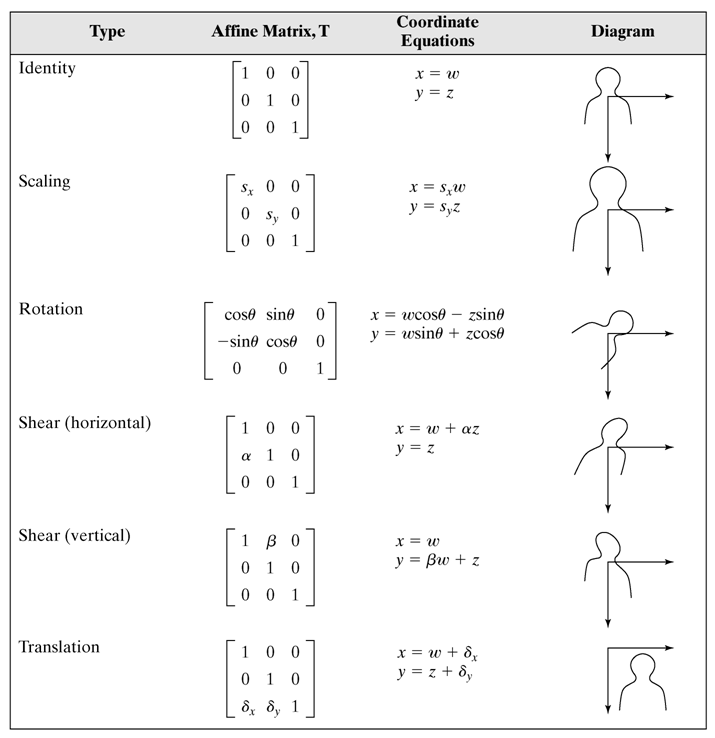
在matlab里面实现
wz = [3 4 1];
T = [2 0 0; 0 3 0; 0 0 1];
xy = wz * T;
wz = xy * inv(T);
为了避免归一化参数,我们可以借助maketform函数:
T = [2 0 0; 0 3 0; 0 0 1];
tform = maketform('affine', T);
wz = [1 2; 3 4];
xy = tformfwd(wz, tform);
wz = tforminv(xy, tform);
我们可以用一个栅格图像来形象的表示这些变换的效果: 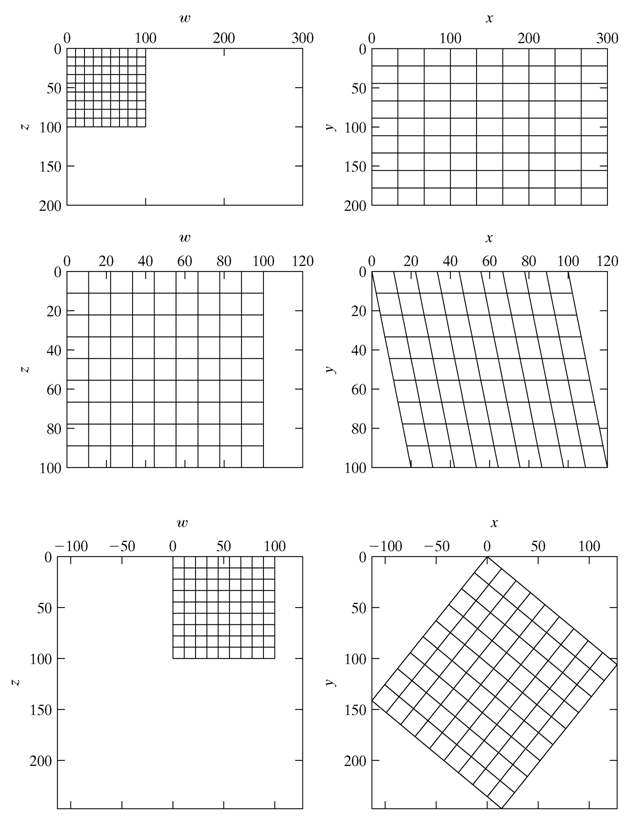
这些变换使用的变换矩阵分别是:

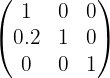

2. 对图像应用空间变换
在matlab中使用imtransform实现图像的空间变换。语法是
g = imtransform(f, tform, interp);
其中,interp可以是'nearest','bilinear'或者'bicubic'。
比如:
f = chekerboard(50);
s = 0.8;
theta = pi/6;
T = [s*cos(theta) s*sin(theta) 0;
-s*sin(theta) s*cos(theta) 0;
0 0 1];
tform = maketform('affine', T);
g = imtransform(f, tform);
3. 图像配准